lor
Being one of the cheapest Android phone in September/11 priced at 6700/- INR ,made me grab one to taste the android candy .During the buying i did a heavy re-search on all type of android phones and at the end i bought this,so here i will present you a full review with all pros and cons which made me owner of this wonderful(atleast according to me)device
3.5mm jack Yes
MEMORY
Phonebook Practically unlimited entries, Photocall
Bluetooth Yes, v2.1 with A2DP
BATTERY Standard battery, Li-Ion 1450 mAh

 Back to Top
Showing posts with label micromax. Show all posts
Showing posts with label micromax. Show all posts

Sorry folks i haven't tried this Rom becoz the members said its only having a customization at cost of performance and i hate this,also its an improvement of Hybrid v2,so by just conversing i am going to post the PROS and CONS
PROS
PROS
- Fast
- Marvelous Looks
- WiFi working
CONS
- Fast Battery Drain
- Bad music quality(as in hybrid v2,i told u its an modification not improvement of that)
Download link of zip is here
The best Rom till now acc. to me,it was released twice with second release of v1(ie v1.3.2) having some stability improvements. As its name suggests its an fusion of asevmaxx and leandros v1 Roms published earlier.
So it inherits all properties of leandros v1(with fixed wifi)
As i always do ,keeping it short here i goes directly to PROS and CONS
PROS

So it inherits all properties of leandros v1(with fixed wifi)
As i always do ,keeping it short here i goes directly to PROS and CONS
PROS
- Rooted
- Busybox
- ADW launcher in place of stock
- Pre-installed Chainfire 3D(improves graphics accleration)
- Removed Bloatware(means micromax apps)
- Zipallign at boot
- JIT enabled
- Improved Build.prop
- Ext partition quick reboot fix
- GREAT BATTERY backup
- You don't need any task killer or any damn app for CPU , ram , sd boost or anything.....they all are pre-enabled
CONS
- No flash player for stock browser
- No Darktremor's Apps2sd but we have an partial remedy for this also
Final Verdict:
A thumbs Up!!!A very good ROM,an excellent effort without source code.The best ROM and I too uses this in my device and will continue to , till the day i delete this line
So Download links Are here
ALSO A TREAT FOR CUSTOMIZATION LOVERS,JUST FLASH THIS ZIP AFTER SUCCESSFUL INSTALL OF ROM and get the looks below free free free !!!

A successor(acc. to developer but actually it was not)to hybrid v1 ,as we know the dev. of HYBRID roms was actually dev of asevmaxx roms so he just keep on customizing leandros or asevmaxx and this time he customized asevmaxx.
So came the problems also all the problems of asevmaxx v2 got inherited
Shorty short topic so PROS and CONS
PROS
So came the problems also all the problems of asevmaxx v2 got inherited
Shorty short topic so PROS and CONS
PROS
- Flash player support in stock browser
- WiFi working
- Some cool apps like easy installer
- Best APPS2SD script(for one who knows ,its the Darktremor's one)
- BIOS bootanimation
CONS
Well this one has serious cons
- Hangs like hell after some hours
- Restarts frequently
FINAL VERDICT:
A fail after such a wonderful rom like hybrid v1
well my duty,the DOWNLOAD link is here
The day finally came when i and other user got a sigh of relief ,the day was publishing of this ROM an excellent work-piece by Mr. Karan of "Android-forums" and a brilliant ROM for micromax a70 in the absence of its source code
Hats-Off to the man
Now cutting it short to PROS and CONS
PROS
CONS
Hats-Off to the man
Now cutting it short to PROS and CONS
PROS
- Rooted
- Gingerbread launcher
- Super-fast(benchmarks of 1000+)
- Some cool apps
- Cool Cyno colored android boot screen
- Custom Busybox(needed for root operations)
- WiFi didn't worked either but was worked out later,and was having range improvement
CONS
- Problems in usb tethering
- Live wallpaper out(can be restored using titanium backup or any other apps backup made by you)
The latest download link of leandros v1 having WiFi fix by rahul is here
In every aspect it was a superb effort and one of my favorite roms
The words of the developer "It's the second iteration of the Leandros ROM",well it was not, seriously speaking it was a fail,sorry karan but u have to admit it
Cutting it short ,so we are not going to discuss PROS and CONS as it is same as v1 but with some performance improvement and some great apps but it accompanies heavy battery drain and no wifi
Apps Bundled
Cutting it short ,so we are not going to discuss PROS and CONS as it is same as v1 but with some performance improvement and some great apps but it accompanies heavy battery drain and no wifi
Apps Bundled
- LauncherPro is default Launcher /balancer as substitute
- File Expert which also has a root browser
- Live Wallpapers(was excluded in previous version)
- Substrate Live Wallpaper bundled
- No-Frills CPU bundled
- K-9 mail bundled .Its better than gmail .Trust me .
- Titanium backup for backup/restore
- ROM ToolBox for the many tweaks your heart desires (but doesn't support A70 so its a waste).
Download the Zip from here
Now after a long long days of hard Mr. Sam finally made a commendable ROM with a surprise
Cutting everything short my fav PROS and CONS
PROS
Cutting everything short my fav PROS and CONS
PROS
- Zipalign on boot( Zipalign is an archive alignment tool that provides important optimization to Android application (.apk) files )
- Some add-ons
- Zeam launcher(light and good)
- Apps to SD-ext
- Tweaks like internet speed,user speed
- removed crap apps
- JIT(just-in-time) enabled( allows software to run faster by “compiling bytecode into native machine code at runtime which substantially increases performance” )
- And the surprise !!!! WIFI working ,yepiee
CONS
- Lags and restarts
- only the success of wifi and none other advantage over previous ROM(s)
Note:Its still under development so in coming future there are chances of a new release of this ROM as the developer is trying hard to make it compete with cm-7
Downlaod here
A successor of Droidmaxx v1 and followed by Droidmaxx v3
it was a beta type test for Droidmaxx v3,so no links for this one too !!!
it was a beta type test for Droidmaxx v3,so no links for this one too !!!
Asevmaxx v2(or rather v2.2.1,don't know why this is added but its none of our business) ROM as the name suggest a successor of Asevmaxx v1 .A much improved version with a tweaked KERNEL and really i mean it.Cutting Everything Short here is my fav PROS and CONS
PROS
PROS
- almost all pros of v1 plus inheritance from Aseventy and Droidmaxx v2
- better banchmarks
CONS
- It lagged,and when it lagged it lagged like hell and mostly restarts
- Sometimes USB connection creates problem
Downlaod link is Here
And a tweaked KERNEL is also Here
And the flash player 10.2(sorry only this level is achieved) optimized for our processors is here
Instructions
- First flash ROM
- Then KERNEL
Another custom ROM effort for A70,by a kid named Gautam by customizing Aseventy by PFG
cutting intro short here are the PROS and CONS
PROS
Almost all features Of Aseventy plus some others
cutting intro short here are the PROS and CONS
PROS
Almost all features Of Aseventy plus some others
- At that time first ROM which was having embedded supported flash player 10.1 in stock browser
- many scripts included to smooth-en the UI
- The boot screen was that of like a PC BIOS screen
Now comes CONS
again all cons of Aseventy(yes,all cons),ahan surprise surprise plus we have more
- Camera Doesn't works
For those who wants to download ,sorry its taken off now !!! Plz get some other ROM.
Now this is the most sensitive area ,so plz be serious and pay attention to each and every institution,so here are my instructions(a note; if u have been listening with full attention and care then by now u would have noticed the my mistake of writing instruction as institution ,i u have then its good ,if not then get the Hell serious,its not a joke !!! )
Instructions are divided on two parts(i.e. if u have a ROM with its kernel or u have a ROM without kernel)
First Common instruction is DO a Backup of your working device via CWM Recovery or any other recovery you know
Secondly i assume that u have copied the ROM zip file to your SD-card already and
Thirdly that you are on Stock Rom ohterwise,plz first roll back to it,as it ensures problem and successful flash of ROM
Instructions are divided on two parts(i.e. if u have a ROM with its kernel or u have a ROM without kernel)
First Common instruction is DO a Backup of your working device via CWM Recovery or any other recovery you know
Secondly i assume that u have copied the ROM zip file to your SD-card already and
Thirdly that you are on Stock Rom ohterwise,plz first roll back to it,as it ensures problem and successful flash of ROM
- For Rom Without kernel zip along with it
- Boot into CWM recovery by first switching off and the powering on the device by holding the button combination(varies with device,for A70 its VOL.Down button and power button)
- Take a Backup
- Factory reset from the menu of CWM
- Flash the ZIP of the ROM from the folder in which u kept it on your sd-card
- After flashing of rom /installation of rom by CWM is done then
- Reboot
- And Voila its done(if it Boots up !!!)
- For Rom With Kernel zip
- same procedure as above upto point no. 5
- after that again flash a zip that is having the kernel
- now same as from point no. 6 upto point no. 7
Disclaimer: I am not responsible for any carelessness made by you resulting into bricking or BLAH BLAH !!! type thing. Do it at your own risk
Q.phone is stuck at logo and no cwm recovery
A.just flash recovery from adb or fastboot method..(refer here)
Q.phone is stuck at logo and no cwm recovery
A.just flash recovery from adb or fastboot method..(refer here)
In this post i will tell you about the 5 most essential and RECOMMENDED apps to get the most out of A70(irrespective if you are running stock or any other ROM) as we know system tweaking(android booster),security(netqin se curity full)and many other social apps like fb,ebuddy etc. and opera mini are already included in stock rom,but still we need some more apps to get the best of A70,so here are they
- PowerAmp :Due to limitation of the stock player to play only mp3 and some other type of files(i don't remember them ) so to overcome this and play any(almost) audio format like mp3,wma,etc and it also have a equalizer(also having a option called "Phone(loud)" optimized for speaker only)
So it's monster app. to play any(again almost) type of audio file type
Also the monster apps don't come free,but still it has a trial version to try out,full version to buy out or any cracked version(if any,just Google it) to try full without buying. - QQPlayer :As its slogan go's Any Video,Anywhere, and they mean it,yes you can play any popular format of video file,even HD(if you are having a decent processor of MHz or above),it also comes with an option of suppressing image quality to play even HD(Not Full HD)videos but they will not remain HD for the playing time,but they playback will be smooth.
So it's a monster app. for playing videos,and we have a surprise for you,its totally FREE,yes it comes totally free(till now). - UCBrowser: No need to mention it clearly says all by its name,although A70 stock browser supports all advanced functions,but still we need it to get complete PC web browsing experience as it has flash player 10.0.1 already embedded in it,whats more its also FREE,also i forgot to mention,it supports the latest and refreshing HTML5,so rock the web with it
- Download All Files : An irritating feature which every stock browser(even if its nokia or any other ,and in this case android) has that it prevents some type of files from downloading,so for this Download All Files comes to rescue. Just install it and download any file,whats more it also comes FREE.
- Tubemate :I think till now you must have got the hint,for those who haven't its you-tube video down-loader and i must say an excellent down-loader ,can download any format you want also allow us to stream videos via stock player.
Well that's all for now,stay tuned for more interesting apps,especially for A70.
In this post i will tell you about a simple application to root your a70(and many other devices)
The application is called z4root
The application is called z4root
 |
| Screenshot of z4root |
The link to download page is here(the developers page),or if you get any warning by your anti-virus then you can Google it
Basically this app has got two modes:
Temporary Root
In this once root,you will be rooted till next boot(means restart) but the super-user app is to un-installed manually if you want root to be completely wiped out from your device
Permanent Root
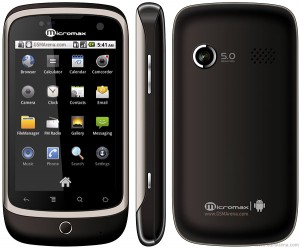 |
| Micromax A70 |
Networks
2G : "Quad-Band" means this phone will work all around the globe with any 2G carrier.
3G : 2100Mhz which means only countries having 3g network in this frequency spectrum will only be able to give its signals to this phone. Also The 3G class is HSDPA,in short it supports a maximum of 7.2 Mbits/sec of bandwidth means a maximum of 921 KB/sec of downloading speed can be achieved
SIZE
DIMENSIONS : 111 x 58 x 13.5 mm
Weight : 85 g
DISPLAY
Type TFT capacitive touchscreen, 256K colors,HVGA
Size 320 x 480 pixels, 3.2 inches (~180 ppi pixel density)
Multitouch Yes
SENSORS
Accelerometer, proximity and Touch-sensitive controls
Loudspeaker Yes,and that too of very good quality
3.5mm jack Yes
MEMORY
Phonebook Practically unlimited entries, Photocall
Call records Yes
Internal 160 MB storage, 256 MB RAM(190 mb user available)
Card slot microSD, up to 32GB, buy memory
DATA
GPRS Yes
GPRS Yes
EDGE Yes
3G HSDPA, 7.2 Mbps
WLAN Wi-Fi 802.11 b/g, Wi-Fi hotspot
Bluetooth Yes, v2.1 with A2DP
USB Yes, microUSB v2.0,data cable included
CAMERA
Primary 5 MP, 2592х1944 pixels, autofocus(and they mean it)
Primary 5 MP, 2592х1944 pixels, autofocus(and they mean it)
Video
Secondary Yes, VGA
Video
Video
FEATURES
OS Android OS, v2.2 (Froyo)
OS Android OS, v2.2 (Froyo)
CPU(Central Processing Unit) 600 MHz ARMv6
Chipset Qualcomm MSM7627
Chipset Qualcomm MSM7627
GPU(Graphics Processing Unit) Adreno 200, its like we have graphic card in our computers ,and for reference its good for playing most of the games excluding HD games.
Messaging SMS(threaded view), MMS, Email, Push Email, IM
Browser WAP 2.0/xHTML, HTML
Radio FM radio
Colors Cocoa Brown
GPS Yes, with A-GPS support
Java Yes, via Java MIDP emulator
- - SNS applications
- - MP3/WAV/AAC player
- - MP4/H.263 player
- - Organizer
- - Image/video editor
- - Document editor (Word, Excel, PowerPoint, PDF)
- - Google Search, Maps, Gmail,
- YouTube, Calendar, Google Talk, Picasa integration
- - Voice memo
- - Predictive text input
BATTERY Standard battery, Li-Ion 1450 mAh
Stand-by Up to 168 h
Talk time Up to 4 h only if 2G networks are used
Now the time for Pros and Cons
Pros
Now the time for Pros and Cons
Pros
- good display,actually best in its class
- very tough screen,although not gorilla glass but enough to bear a sudden jerk
- best call quality,with least call-drops among the whole range of smartphones
- GPU Aderno 200,makes almost all(excluding HD)games to work on this device flawlessly
- 5.0 Mega-pixel camera
- Front Vga camera
- Good Loudspeaker
- Quite responsive touch
- Almost all essential apps like Mobile Guard,Mobile Security,Google maps,opera mini,facebook,ebuddy,etc. are already installed
NOW its time for Cons
- Very Weak wifi antenna almost u can say negligible,u have to sit very close to router to get wifi signals
- NO flash for camera
- Not flash player enabled device ,but that can be installed by a method in further posts
- no upadte of 2.3 from micromax,nor a custom kernel as kernel source is not released by micromax so we cannot port any other rom to this mobile(New to android ?,just forget about this point !!! come back later after buying the phone,for now go to next point)
- vibrator problem,sometimes a little jerk makes its loosely connected vibrator to stop working,that too can be restored by again giving a jerk
- 190mb internal space,so if not modified(for modifications refer further posts) can run into low memory space problem.
- this point is only for advanced users,low 152 mb of ROM disk so ROM must have to be de-oxidized., also to get adb support one have to struggle for this device
- Poor micromax service,i.e. if once your phone gets into some problem,fooooo its gone for a long time
So these are all the pros and cons and some specifications of Micromax a70 ,now choice is yours !!!!!!!
A full in-depth video by iGyaan.in is here
THE TECH NO FREAK


© Copyright THE TECH NO FREAK. All rights reserved.
Designed by FTL Wordpress Themes | Bloggerized by FalconHive.com
brought to you by Smashing Magazine